


Checking your PSIRA account online is much easier when you know where to log in and which details are required. The PSIRA Login 2026 process gives registered security officers and businesses access to important online services, account information, and application-related updates without unnecessary delays.In this guide, you’ll learn how to log in to PSIRA online, what to do if you forget your password or username, how OTP login works, and how to resolve common login problems. We’ll also explain the key services available after logging in and how to use the official PSIRA portal safely.
How to Access Your PSIRA Login Account Online?
If you work in South Africa’s private security sector, the PSIRA Login portal is an important online resource for managing your security-related records and services. Security officers, business owners, and other industry participants can use the online system to access account information, manage relevant services, follow registration or renewal processes, and keep track of their PSIRA records.For a smooth login experience, it is important to use the correct PSIRA online portal and enter the required account details accurately. If you experience problems accessing your account, such as forgotten credentials or a locked profile, there are recovery options available. This guide explains the PSIRA Login: https://digitalservices.psira.co.za/login-otp process, what you may need before signing in, how to deal with common access problems, and why keeping your login and certificate information secure is important.

What Is the PSIRA Login Online Portal?
The Private Security Industry Regulatory Authority (PSiRA) regulates South Africa’s private security industry. Its online services provide registered users with a way to manage certain services electronically rather than handling every request at a physical office.Depending on your profile, online services can include registration-related activities, certificate services, bookings, payments, and access to your account information.Before attempting to access your account, make sure you are using the correct PSiRA website and have the details associated with your profile available..If you want to know about WSU Status check Click Here.

How to Register for a PSiRA Online Account
If you have not created your online profile yet, you need to complete the registration process before attempting to sign in.
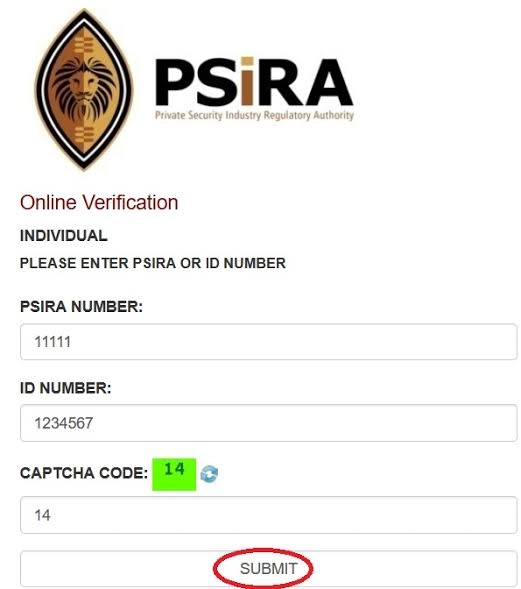
Step 1: Open the Official PSiRA Website
Visit the official PSiRA website at www.psira.co.za and look for the Online Services section.Choose the service or profile type that applies to you, such as a security officer or security business.
Step 2: Choose the Registration Option
When the registration prompt appears, select “No, Register Now” if you do not already have an account.The system will display the relevant requirements. Review them carefully before continuing.
Step 3: Confirm Your Eligibility
If you meet the requirements shown by the system, select “Yes, I meet the requirements.”You will then be taken to the online registration form.
Step 4: Complete the Registration Form
Enter your personal or business information accurately. Make sure the information corresponds with your official records because incorrect details can cause problems later when accessing or managing your profile.complete the required fields and any security verification shown on the page.
Step 5: Submit Your Registration
Complete the CAPTCHA or “I am not a robot” verification and select Submit.Keep any registration information or login details provided to you in a secure place. You may need them when accessing your account later.
How to Complete a PSIRA Login
Once your online profile has been created, you can use the official digital-services portal to access your account.
Step 1: Visit the Official Login Page
Open the official PSiRA digital-services portal and locate the login page. Always check that you are using the legitimate PSiRA website before entering personal or account information.
Step 2: Enter Your Login Details
The online system provides a username and password login method. Enter your registered username and password carefully.Avoid sharing these credentials with friends, colleagues, agents, or anyone claiming that they need them to complete a PSiRA service for you.
Step 3: Complete Security Verification
Depending on the access method being used, you may be asked to complete an additional security verification step.Follow the instructions displayed by the portal and make sure the information you provide matches your registered account.
Step 4: Open Your Account
After your credentials have been successfully verified, you can access the services available to your profile.If the details are rejected, check for typing errors before trying again. Repeatedly entering incorrect information can make account access more difficult.
PSIRA Login With OTP
Users who have access to the cellphone number linked to their PSiRA profile may also be able to use the OTP login option.OTP verification provides an additional way of confirming that the person attempting to access the account has access to the registered mobile number.To use this option, select the PSIRA Login Login with OTP option on the official portal, enter the registered cellphone number, request the OTP, and enter the verification code when it is received.Make sure your cellphone is active and able to receive SMS messages. Never give your OTP to another person, even if they claim to be helping you with your account.If you want to know about WSU Status check Click Here.
Who Needs a PSiRA Online Account?
A PSiRA online account can be useful for people and organizations involved in the private security industry.
This may include:
People who only want to verify whether a security officer or security business is registered may not need to log into an account. PSiRA also provides verification services for checking registration information.
What Can You Do After Logging In?
Your available services depend on your profile and the services applicable to you. The online platform can make several administrative tasks more convenient.
Certificate Services
Registered users may be able to submit certificate-related requests through their online profile. Where an online psira renewal service is available, the request can be completed through the relevant service section.
Branch Bookings
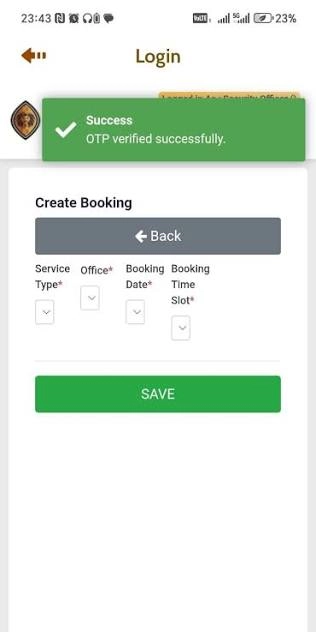
Users may also need to make appointments or bookings for services that require attendance at a PSIRA online booking branch.The PSIRA online booking process generally involves selecting the required service, choosing an available branch, selecting a suitable date and time, and saving the booking details.
Always keep your booking information available if you need to visit a branch.
Payments and Service Requests
Depending on the service, the portal may allow users to submit service requests and complete applicable payments online. Read each screen carefully before confirming a transaction.
Forgot Your PSiRA Password?
Forgetting your password does not necessarily mean you need to create a new account.If you cannot remember your password, look for the PSIRA Login Forgot Password option on the official login page. You may be asked to provide your username so the system can send instructions for resetting your password.Follow the recovery instructions sent through the registered communication channel and create a new password that is difficult for others to guess.Avoid using simple combinations such as your name, date of birth, or easily identifiable information.
What If You Forgot Your PSiRA Username?
If you cannot remember your username, check the registration information or account communication you received when creating your profile.Do not repeatedly enter random information because this can make the recovery process more complicated. Use the official recovery instructions available through the PSiRA portal or contact PSiRA if you cannot identify the correct username.
Keeping your original registration information in a safe place can prevent this problem in the future.
What If Your Cellphone Number Has Changed?
A changed or lost cellphone number can become a problem when you use OTP-based account access.If the mobile number connected to your profile is no longer available, use the relevant PSIRA Login Forgot Mobile Number or account-recovery option provided by PSiRA rather than trying to create a second profile.The recovery process may require you to provide identification or answer security questions before the new number can be connected to your account.
Make sure the new cellphone number is active and accessible to you. This is particularly important if you depend on OTP verification for future account access.
Common PSIRA Login Problems and Solutions
Even when you enter the correct information, you may sometimes experience difficulties accessing your profile.
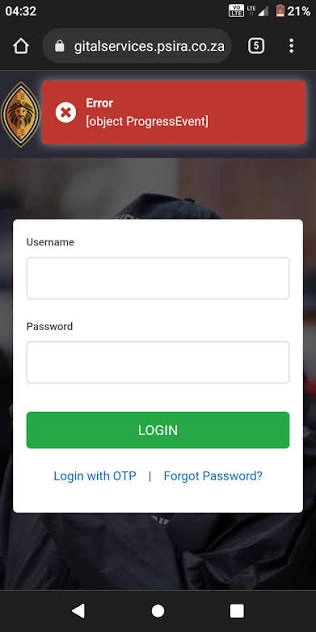
Incorrect Username or Password
Check that Caps Lock is not enabled and make sure there are no unnecessary spaces in your username or password. If you still cannot access the account, use the official password-recovery option.
OTP Not Received
If an OTP does not arrive, check whether your cellphone has network coverage and whether the number you entered is the one registered with your PSiRA profile.Avoid repeatedly requesting codes if the system is delayed. Wait for the appropriate period and follow the instructions displayed on the portal.
Old Cellphone Number
If you no longer have access to the number connected to your profile, use the official mobile-number recovery process rather than asking another person to receive the OTP on your behalf.
Website or System Problems
Sometimes an online service may be temporarily unavailable because of maintenance or technical problems. If the portal is not responding, try again later.You can also check your internet connection and refresh the page before assuming that there is a problem with your account.
Account Access Still Not Working
If you have checked your credentials and completed the available recovery steps but still cannot access your account, contact PSiRA directly for assistance.The PSiRA contact number provided in the supplied information is 086 133 3850, and the supplied email contact is [email protected].
How to Keep Your PSiRA Account Secure
Protecting your account is just as important as knowing how to access it. Your login information should be treated as private.Never send your password or OTP through WhatsApp, social media, SMS, or email to someone claiming to represent psira check with id unless you have independently confirmed the request through an official channel.Use the official PSiRA website whenever possible, especially when entering identification information, passwords, or banking details.You should also avoid saving your password on public or shared computers. If you use a computer belonging to someone else, log out completely after finishing your session.
PSiRA Login vs PSiRA Verification
It is important to understand the difference between account access and verification.PSIRA Login is used to access your personal or business profile and the online services available to that account. Verification services, on the other hand, are intended for checking whether a security officer, security business, or other relevant provider has valid registration information.For example, an employer may want to verify a security provider before hiring them. That does not necessarily require the employer to access the security provider’s private online account.
When Should You Contact PSiRA?
You should consider contacting PSIRA Login when the online recovery options do not solve your problem, particularly if:
When contacting PSiRA, keep your relevant registration or identification information available so that the support team can understand your issue more easily.
Tips for a Smooth Online Experience
Before starting an online service, prepare the information you may need. Use an active cellphone number and email address, check your internet connection, and keep your registration details somewhere secure.If you are completing an important request, carefully review all information before submitting it. Saving confirmation messages, booking details, and reference information can also make it easier to follow up if an issue occurs later.
Most importantly, always distinguish between the official PSIRA Login portal and third-party websites that simply publish information about PSiRA services. Never enter sensitive login information into an unfamiliar website.
FAQ’s
Conclusion
The PSIRA Login process gives security officers and businesses convenient access to important online services and account information. By using the correct credentials, following OTP verification instructions, and making use of the official recovery options, many common account-access problems can be resolved without unnecessary delays.Keep your username, password, cellphone number, and other account information secure, and always use official PSiRA channels when managing your profile. If an issue cannot be resolved through the online options, contacting PSiRA directly is the safest way to receive further assistance.