


Applied for admission to Tshwane University of Technology? Use the official TUT Status Check portal to track your application, view admission updates, and find out if any further action is required. Regularly checking your status helps you stay informed and avoid delays in the 2026 admission process.
What Is TUT Status Check?
After submitting your admission application to Tshwane University of Technology (TUT) for the 2026 academic year, the next important step is completing your TUT Status Check to monitor your application’s progress. The official online status portal lets applicants see whether their application is under review, requires additional documents, has been provisionally accepted, or has received a final admission decision. By checking your status regularly, you can respond quickly to any updates, avoid unnecessary delays, and stay informed throughout the admission process. If you have not yet applied, you can first complete the TUT online application before using the status checking service.FOR more details visit My Home: https://saservicesinfo.com/

How to Complete Your TUT Status Check Online
After submitting your TUT online application, you can monitor its progress through the university’s official online portal. Performing a TUT Status Check regularly helps you stay informed about your admission progress and ensures you don’t miss any important updates or requests from the university.

Step 1: Visit the Official TUT Website
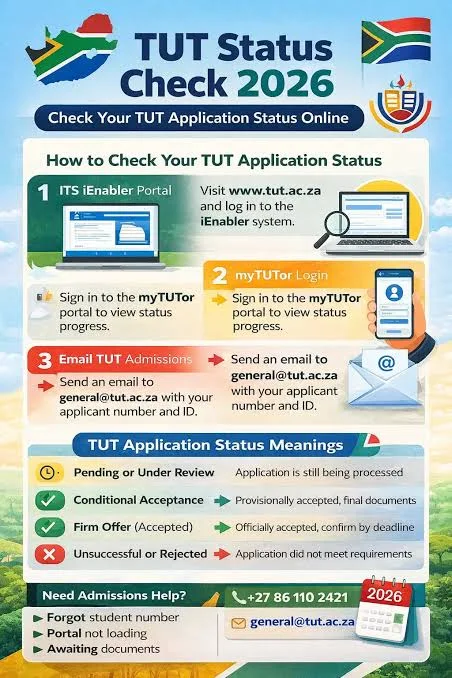
Open your preferred web browser and go to the official Tshwane University of Technology website at www.tut.ac.za. From the homepage, select Study at TUT and then click iEnabler to access the student portal.
Step 2: Sign In to the iEnabler Portal
On the iEnabler login page, enter the required information, such as your student number, ID number, or any other requested credentials. TUT Login Status Verify your details carefully before proceeding to avoid login errors.
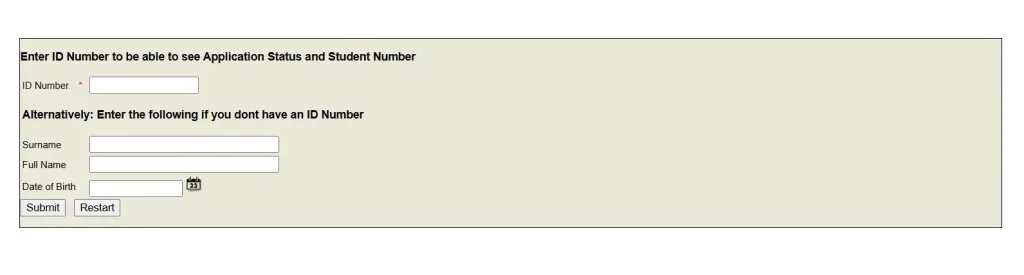
Step 3: View Your Application Status
After signing in, navigate to the Application Status section. The system will display the latest update for your admission application, allowing you to see whether it is still being processed, requires additional documents, or has received a final decision. Checking your TUT Status Check page regularly helps you respond quickly to any changes.
Other Ways to Check Your TUT Application Status
If you cannot access the online portal, there are several alternative methods to monitor your application.
- TUT ITS iEnabler: Use the ITS iEnabler system to view detailed admission updates and application progress.
- Email Support: Send your enquiry to [email protected], including your full name and application details for faster assistance.
- myTUTor: You can also log in to myTUTor (sometimes searched as my tutor) to access student services and other academic resources once your account has been activated.
Understanding TUT Application Status Results
When you complete a TUT Status Check, you may see one of the following application statuses:
Pending or Under Review
Your application has been received and is currently being evaluated. No admission decision has been made yet, so continue checking your status for updates.
Conditional Acceptance
This means you have been provisionally accepted. However, the university still requires outstanding documents, final examination results, or other verification before confirming your admission.
Firm Offer
Congratulations! Your application has been approved, and you have received an official offer of admission. Be sure to accept the offer before the deadline stated by the university.
Unsuccessful or Rejected
If your application is unsuccessful, it means you did not meet the admission requirements for the selected programme. You may explore other available courses or submit a new application during the next admission cycle.
Check Your TUT Status by Email
If you need personalised assistance regarding your admission, you can contact the TUT Check Status Admissions Office by email.
Follow these simple steps:
- Open your preferred email service, such as Gmail or Outlook.
- Create a new email addressed to [email protected].
- Use a clear subject line, such as Application Status Enquiry.
- Include your full name, ID number, application number (if available), and any relevant information to help the admissions team locate your application.
- Send the email and wait for an official response.
The admissions office will review your enquiry and provide an update on your application status or advise you if any additional action is required.
Here’s a completely rewritten, SEO-optimized version with a natural flow. I included TUT Status Check twice and the secondary keyword TUT naturally. It rewrites only the provided section.
Late Applications at TUT
TUT Check Status allows late applications only for programmes where places are still available. For the 2026 academic year, TUT’s official prospectus states that the late application period ran from 15 January to 23 January 2026, and applications had to be submitted online—no walk-ins were permitted. (Tshwane University of Technology)
If you are looking for a TUT late application, always check the university’s official website for the latest programme availability and application announcements. TUT specifically warns applicants to avoid people or websites promising guaranteed admission or asking for money to secure a place. (Tshwane University of Technology)
Official TUT website for applications and late applications: Tshwane University of Technology – Official Website
Important: Late applications are not automatically available for every programme; they depend on remaining spaces. TUT’s official website is therefore the safest place to verify whether a late application opportunity is currently open. (Tshwane University of Technology)

Documents Required at TUT
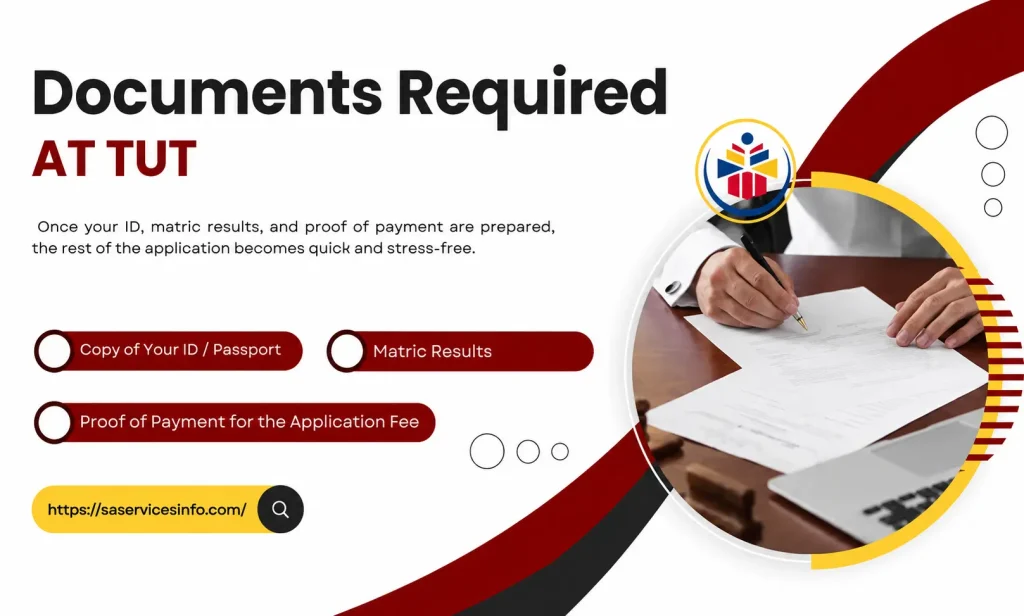
Having the correct documents ready can make your TUT online application faster and easier. Based on the information shown in the image, applicants should prepare a clear copy of their South African ID or passport, matric results, and proof of payment for the application fee before submitting their application.
Important Documents for TUT Application
- Copy of ID or Passport: Provide a clear and readable copy of your valid identification document or passport.
- Matric Results: Keep your latest matric results or relevant academic results ready for submission.
- Proof of Payment: Include proof that the required TUT Status Check application fee has been paid.
Preparing these documents in advance can help prevent delays during the application process. If you have already submitted your application, keep your application details safe so you can later complete a TUT Status Check and monitor your admission progress.
TUT Status Check Problems and How to Fix Them
While performing a TUT Status Check, some applicants may experience technical or application-related issues. Most of these problems can be resolved quickly by following the appropriate solution.
| Issue | Solution |
|---|---|
| Forgot your student or application number | Check your application confirmation email or contact the TUT Admissions Office for assistance. |
| Unable to access the portal | Refresh the page, clear your browser cache, try a different browser, or access the portal during off-peak hours. |
| Application status has not changed | If your status remains unchanged for several weeks, contact the admissions office to confirm that all required documents have been received. |
TUT Results Check and Acceptance Letter
After the admissions team completes the evaluation process, you can log in to the official portal to perform a TUT Status Check and view your admission outcome. Successful applicants can also download their official acceptance letter, which contains important information about registration, orientation, and the next steps before classes begin.
How the TUT Admission Process Works
Every application submitted to TUT follows a standard admission procedure before a final decision is made.
- Submit your online application through the official student portal.
- The university verifies your personal information and supporting documents.
- Your application is reviewed by the admissions department.
- The final decision is published on the online status portal.
Tip: Keep your application reference or student number in a safe place, as it will be required whenever you track your application or contact the admissions office.
Registration and Enrolment After Acceptance
If you receive an admission offer, you’ll need to complete a few additional steps before becoming a registered student.
- Check the official registration schedule.
- Complete the online registration process.
- Verify your enrolment through the student portal.
- Follow all instructions provided by your faculty before the registration deadline.
TUT Academic Calendar and Important Dates
The official TUT Academic Calendar contains essential information for every academic year, including registration periods, semester dates, examination schedules, public holidays, and other important university events. Reviewing the calendar regularly will help you prepare for upcoming deadlines and academic activities.
TUT Prospectus and Available Courses
The officialTUT Status Check Prospectus is the best resource for prospective students who want to explore available study programmes. It provides detailed information about admission requirements, faculties, course offerings, tuition fees, financial aid opportunities, campus facilities, and student support services, helping you choose the programme that best matches your career goals.
TUT Contact Details for Status and Admission Enquiries
If you need help with your application or admission status, you can contact the university using its official support channels.
- Telephone: +27 86 110 2421
- Email: [email protected]
The admissions team can assist with TUT Status Check enquiries, application updates, document verification, registration guidance, and other student-related questions.
What to Do If Your TUT Application Is Still Pending
If your TUT Status Check shows messages such as “Application Received” or “Awaiting Results,” it means your application is still under review by the admissions team. During this period, there are a few important steps you should take while waiting for a final decision.
- Log in to the official iEnabler portal regularly to monitor your application for new updates.
- Keep an eye on your registered email address and mobile phone, as TUT may send important notifications or requests for additional information.
- Make sure the contact details you provided during your application are accurate and up to date.
What to Do If Your TUT Application Was Rejected
If your TUT Status Check shows “Unsuccessful”, don’t lose hope. There are still several options available to continue your admission journey. First, contact the TUT Admissions Office to understand why your application was not approved and whether any supporting documents were missing. You should also check if TUT late application is open for programmes that still have available spaces, as eligible applicants may have another opportunity to apply.If your preferred course is already full, consider applying for a related programme that still has vacancies. If no suitable options are available, prepare your documents and submit a new TUT online application when the next admission cycle begins. If you believe your application was assessed incorrectly, you can contact the admissions office for guidance and clarification regarding your application outcome.
Can You Check Your TUT Application Status by Phone or SMS?
Yes, applicants can request information about their application by contacting the university over the phone during official working hours. The admissions office and contact centre can provide general assistance regarding your application progress and admission enquiries.Although TUT may send SMS notifications to update applicants about important changes, there is currently no SMS service that allows you to request or check your application status manually.For the fastest and most reliable updates, the official iEnabler portal remains the recommended method for completing your TUT Status Check. Once admitted, students can also access additional academic services through myTUTor, making it an important platform throughout their studies.
FAQs
Conclusion
Completing a TUT Status Check regularly is the best way to stay informed about your admission progress and ensure you don’t miss any important updates from Tshwane University of Technology. Whether your application is pending, conditionally accepted, or successful, using the official TUT portal allows you to track your status, download admission documents, and prepare for the next steps. If you encounter any issues, contact the TUT Admissions Office promptly and keep your application details ready. By checking your application status frequently and following the university’s official guidance, you can make your admission process smoother and increase your chances of a successful enrolment in 2026.
[…] TUT Login 2026 is the online sign-in process that allows students at Tshwane University of Technology (TUT) to access the university’s student portal and online academic services. By using their TUT credentials, students can manage important tasks such as checking academic information, registration details, application or admission updates, and university announcements. The TUT student portal is designed to give students convenient access to essential services in one place, making it easier to manage their university-related activities online.If you want to know about TUT Status Check and Track Your Application Status Online CLICK HERE. […]