

Need help accessing your UIF account? This complete UIF Login guide explains how to register on the official Department of Employment and Labour portal, sign in securely, submit your UIF claim, and perform a UIF status check online. You’ll also learn how to recover a forgotten password, check your payment status, resolve common login issues, and use the official government websites with confidence. Whether you’re applying for unemployment, maternity, illness, or adoption benefits, this guide covers every step you need to complete the process successfully in 2026.
What Is UIF Login?
UIF Login is the secure authentication system provided by the South African Department of Employment and Labour. It enables registered users to access their personal Unemployment Insurance Fund account online.
After completing the UIF Login, eligible users can:
- Submit unemployment benefit applications
- Apply for maternity benefits
- Claim illness benefits
- Apply for adoption benefits
- Track submitted claims
- Update personal information
- Upload supporting documents
- Receive notifications about their applications
Employers use a different platform called uFiling, where they declare employees, submit monthly contributions, and manage UIF compliance.
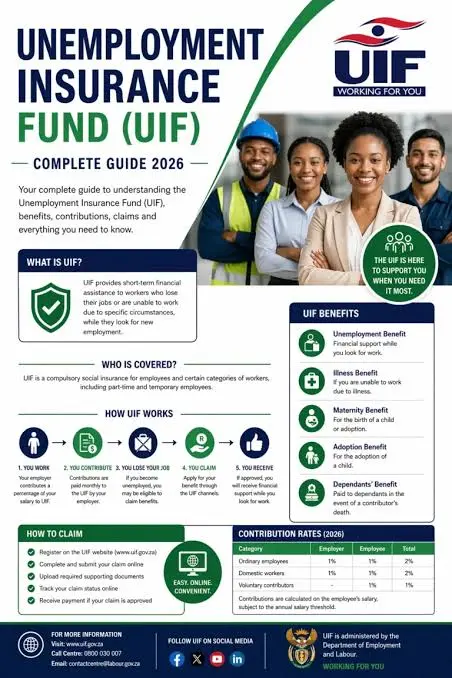
Who Can Use the UIF Online Portal?
The online portal is mainly designed for:
- Employees applying for UIF benefits
- Individuals who have become unemployed
- Mothers applying for maternity UIF benefits
- Workers claiming illness benefits
- Adoptive parents
- Foreign nationals with valid work authorisation
- Previous beneficiaries checking existing claims
Employers should instead access the official uFiling portal for payroll declarations and contribution payments.
Official UIF Login Website
Before entering any personal information, always verify that you are visiting the official Department of Employment and Labour website.
for more details visit my site home page: https://saservicesinfo.com
Individual Benefits Portal
Official website:
https://uifonline.labour.gov.za/uifOnline/loginJsp
This portal allows beneficiaries to:
- Register new accounts
- Complete UIF Login
- Submit online benefit claims
- Upload documents
- Track applications
- Reset passwords
Employer uFiling Portal
Official website:
Employers can:
- Register businesses
- Declare monthly employees
- Submit UIF returns
- Pay contributions
- Update company information
Using only these official government websites helps protect your personal information and reduces the risk of fraud.
Benefits of Using UIF Login Online
Instead of visiting a Labour Centre for every request, the online service lets users complete many tasks remotely.
Some of the biggest advantages include:
- Access your account 24 hours a day
- Submit claims from home
- Upload supporting documents electronically
- Monitor application progress
- Reduce paperwork
- Receive electronic notifications
- Save travel time
- Manage multiple benefit requests from one dashboard
Many users also use the portal for a quick uif status check online after submitting their application.
Documents Required Before Registering
Preparing your documents before starting registration helps prevent delays.
Generally, you’ll need:
| Requirement | Details |
|---|---|
| South African ID | 13-digit ID Number |
| Passport | Foreign nationals |
| Valid Work Permit | Where applicable |
| Mobile Number | Active phone number |
| Email Address | For verification |
| Residential Address | Current address |
| Postal Address | If different |
| Personal Information | Must match official records |
Make sure all information matches your official identification documents exactly.
How to Register for UIF Login
If you’ve never used the online system before, you must create an account before signing in.

Step 1: Visit the Official Portal
Open your preferred web browser and visit:
https://uifonline.labour.gov.za/uifOnline/loginJsp
On the homepage, click Register.

Step 2: Select Your Identification Type
The registration system will ask you to identify yourself.
Choose one of the following:
South African Citizens
Enter your official 13-digit ID number.
Foreign Nationals
Select the foreign national option and provide your passport details or valid work permit information.
Double-check every number before proceeding.
Step 3: Complete Your Personal Profile
Next, provide your personal details.
You’ll normally need to enter:
- Full legal names
- Surname
- Email address
- Mobile phone number
- Residential address
- Postal address (if applicable)
The information should match your official records to avoid verification problems later.
Step 4: Create Your UIF Login Credentials
Now create your account credentials.
Choose:
- A unique username
- A strong password
- Security questions
- Security answers
A strong password usually includes:
- Uppercase letters
- Lowercase letters
- Numbers
- Special characters
Avoid using obvious passwords such as birthdays or your ID number.
Step 5: Verify Your Account
Once registration is complete, the system will send an activation message.
Depending on your selected verification method, you may receive:
- Email verification link
- SMS verification code
Open the email or enter the code to activate your account successfully.
After activation, your UIF Login account becomes ready for use.
Tips for a Successful Registration
Before finishing registration, remember these practical recommendations:
- Use an active email address that you check regularly.
- Keep your mobile number updated.
- Save your username somewhere secure.
- Never share your password with anyone.
- Complete registration in one session if possible.
- Ensure your internet connection is stable.
- Use only the official Department of Employment and Labour website.
Following these steps can help you avoid common registration errors and make future UIF Login sessions much smoother.
Common Registration Mistakes to Avoid
Many first-time applicants experience delays because of avoidable mistakes.
Some of the most common issues include:
- Entering an incorrect ID number
- Using an inactive email address
- Typing the wrong mobile number
- Choosing a weak password
- Leaving mandatory fields incomplete
- Closing the browser before account activation
- Attempting registration on unofficial websites
Avoiding these mistakes can save time and reduce the need to restart the registration process.
How to Complete UIF Login Successfully
If you have already registered your account, follow these steps to access your dashboard.
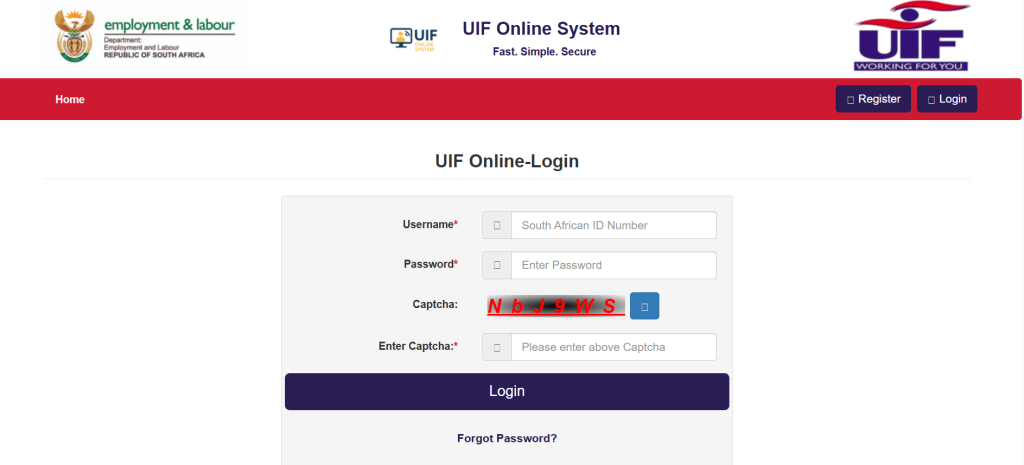
Step 1: Visit the Official Login Page
Open your browser and visit:
https://uifonline.labour.gov.za/uifOnline/loginJsp
Always check that the website ends with .labour.gov.za before entering your personal information.
Step 2: Enter Your Username
Type the username you created during registration.
Check for:
- Correct spelling
- No extra spaces
- Correct capital letters if applicable
Step 3: Enter Your Password
Enter your secure password carefully.
Remember:
- Passwords are case-sensitive.
- Avoid copying and pasting from saved notes if formatting may add spaces.
Step 4: Complete the CAPTCHA
The portal displays a security CAPTCHA to verify that you are a genuine user.
- Type the characters exactly as shown.
- If the image is unclear, click the refresh icon to generate a new CAPTCHA.
- Complete this step before submitting your UIF Login request.
Step 5: Access Your Dashboard
Click the Login button.
If your credentials are correct, you will be redirected to your personal dashboard, where you can:
- Submit new benefit applications
- Upload supporting documents
- View existing claims
- Update personal details
- Monitor claim progress
- Download available documents
Understanding the UIF Dashboard
After a successful UIF Login, your dashboard serves as the central place for managing your UIF account.
Depending on your eligibility, you may see options such as:
- New Benefit Application
- My Claims
- Upload Documents
- Personal Profile
- Notifications
- Account Settings
- Claim History
Review all details carefully before submitting any new application.
How to Apply for UIF Benefits Online
Submitting a claim online is much easier when all your documents are ready.
Step 1: Choose Your Benefit Type
Select the benefit that matches your situation, such as:
- Unemployment Benefits
- Maternity Benefits
- Illness Benefits
- Adoption Benefits
Choose only the category that applies to your circumstances.
Step 2: Complete the Application Form
Fill in every required section carefully.
You may need to provide:
- Personal information
- Employment history
- Employer details
- Banking information
- Contact information
Ensure all information matches your official records.
Step 3: Upload Supporting Documents
The portal may request supporting documents depending on your benefit type.
Common documents include:
- South African ID or passport
- Proof of banking details
- Employment-related documents
- Additional supporting records requested by the Department
Upload clear, readable files to avoid processing delays.
Step 4: Review Your Application
Before submitting:
- Verify your ID number
- Confirm your contact details
- Check uploaded documents
- Review banking information
A careful review helps prevent unnecessary delays.
Step 5: Submit Your Claim
Click Submit once everything is complete.
After submission, the system records your application for processing. You can return to your dashboard later to perform a uif status check online and monitor progress.
UIF Status Check Online
Many applicants want to know whether their claim has been received or approved. The portal allows you to perform a uif status check online directly from your account.
To check your claim status:
- Complete your UIF Login.
- Open your dashboard.
- Select My Claims or the relevant claim section.
- Choose the application you want to review.
- View the current status displayed by the system.
Regularly checking your claim helps you identify whether additional information or documents are required.
UIF Payments Status Check Using ID Number
Many users search for uif payments status check using id number to confirm payment progress.
Once logged into the official portal, your registered profile is linked to your identification details. If payment information is available for your approved claim, it will be reflected within your account.
Always use the official UIF Login portal to check payment-related information and avoid sharing your ID number on unofficial websites.
UIF Status Check Online USSD
Some users search for uif status check online ussd when looking for alternative ways to monitor their applications.
The Department of Employment and Labour primarily provides claim management through its official online platforms. Before relying on unofficial sources or third-party services, always confirm the latest available options through the official UIF website or the Department’s support channels.
www labour gov za UIF Claim Status Check Balance
Another common search term is www labour gov za uif claim status check balance. Applicants generally use this phrase when they want to review the progress of a submitted claim or check whether benefit payments have been processed.
The recommended method is:
- Visit the official UIF Login portal.
- Sign in using your registered account.
- Navigate to your claim information.
- Review the available payment or claim details displayed on your dashboard.
Common UIF Claim Status Messages
After submitting your application, you may see one of the following statuses:
| Status | Meaning |
|---|---|
| Submitted | Your application has been successfully received. |
| Pending | Your claim is under review. |
| Documents Required | Additional supporting documents are needed. |
| Under Verification | Information is being verified. |
| Approved | Your claim has been approved. |
| Rejected | Your application was not approved. Review the reason provided. |
The exact wording may vary depending on the stage of processing.

Tips to Avoid Claim Delays
To help your application move through the process smoothly:
- Submit complete and accurate information.
- Upload clear copies of all required documents.
- Ensure your banking details are correct.
- Monitor your dashboard regularly after UIF Login.
- Respond promptly if additional information is requested.
- Keep your email address and mobile number up to date.
These simple steps can reduce unnecessary delays and improve your overall experience with the online system.
How to Reset Your UIF Login Password
If you have forgotten your password, you can reset it through the official portal without creating a new account.
Step 1: Open the Login Page
Visit the official UIF Login portal and click Forgot Password?
Step 2: Verify Your Identity
Depending on your account type, provide the required information.
Individuals
- South African ID Number
- Passport Number (Foreign Nationals)
Employers
- UIF Reference Number
- Company Registration (CK) Number
Step 3: Continue the Verification Process
Click Proceed after entering your details.
The system will verify your information before allowing password recovery.
Step 4: Receive the Reset Link
A password reset link or verification code will be sent to your registered:
- Email address
- Mobile phone number (SMS)
Check your Spam or Junk folder if you do not receive the email immediately.
Step 5: Create a New Password
After verification:
- Choose a strong password.
- Confirm the new password.
- Save the changes.
- Return to the UIF Login page and sign in using your updated credentials.
How to Recover a Forgotten Username
If you cannot remember your username, the portal also provides a recovery option.
Follow these steps:
- Visit the official UIF Login page.
- Select Forgot Username.
- Enter your ID number or passport number.
- Click Proceed.
- Your registered username will be sent to your email address or mobile phone number.
Once recovered, you can log in normally.
Common UIF Login Errors and Solutions
Most login problems can be resolved quickly by checking your details or using the recovery options.
| Error Message | Possible Cause | Recommended Solution |
|---|---|---|
| Invalid CAPTCHA | Characters entered incorrectly | Refresh the CAPTCHA image and try again. |
| Incorrect Username or Password | Login details do not match | Use the password or username recovery option. |
| Account Locked | Too many failed login attempts | Wait for the lock period to expire or reset your password. |
| Session Expired | Browser remained inactive | Refresh the page and sign in again. |
| OTP Not Received | Contact details may be outdated | Check your Spam folder or update your contact details through the Department of Employment and Labour. |
| UIF Reference Number Not Found | Incorrect employer information | Verify the UIF reference number before trying again. |
Tips for Safe UIF Login
Keeping your account secure helps protect your personal information and claim details.
Follow these best practices:
- Use only the official government websites.
- Never share your username or password.
- Create a unique password with letters, numbers, and symbols.
- Change your password if you suspect unauthorised access.
- Avoid logging in from public computers.
- Log out after each session.
- Keep your contact details updated.
These habits reduce the risk of unauthorised access to your account.
Official UIF Support Contact Details
If you cannot resolve your issue online, contact the Department of Employment and Labour using the official support channels.
| Support Service | Details |
|---|---|
| Toll-Free Helpline | 0800 030 007 |
| Operating Days | Monday to Friday |
| Operating Hours | 07:30 – 16:00 |
| UIF Online Portal | https://uifonline.labour.gov.za/uifOnline/loginJsp |
| uFiling Portal | https://ufiling.labour.gov.za/ |
If your registered mobile number or email address has changed, you may need to visit your nearest Labour Centre to update your records before accessing certain services.
Frequently Asked Questions
Conclusion
The UIF Login portal has made it much easier for employees and beneficiaries in South Africa to manage their Unemployment Insurance Fund services online. From creating an account and submitting benefit claims to performing a uif status check online, tracking payments, and recovering forgotten login credentials, most tasks can now be completed securely through the official Department of Employment and Labour website.Whether you are applying for unemployment, maternity, illness, or adoption benefits, using the official UIF Login portal ensures your information remains secure while giving you convenient access to your claim whenever you need it. For employers, the uFiling portal remains the official platform for declarations, contributions, and compliance. By following the steps and best practices outlined in this guide, you can confidently manage your UIF account and avoid many of the common issues faced by first-time users.
[…] clickUP is the University of Pretoria’s learning management system. It is built using Blackboard technology and is designed specifically around teaching and learning activities.While the student portal handles broader university services, clickUP focuses on your enrolled courses and learning materials. Students may use it to access lecture content, submit assignments, participate in discussions and complete online assessments.For students searching for up click up login information, it is useful to remember that clickUP is the learning platform, while the main UP portal covers wider student services.if you want to know about UIF LONGIN click here […]